Design brief template
Template · 7 min read · By Utkarsh Dhairya Panwar · Updated
A design brief is a one-to-two page document telling a designer the problem, the audience, the success metric, the scope, and the constraints and deadlines. The template below has twelve fields, and the builder turns eight short answers into a brief you can send. The first four matter most.
Build your brief here
The builder asks for eight things: company, product, the problem, who it's for, what success looks like, scope, deadline and links. Budget and brand adjectives wait for the first call, because a sharp problem line keeps a quote honest better than a number typed into a form.
The interactive version of this tool runs in your browser on this page; nothing you enter is sent anywhere.
Your draft is saved in this browser's local storage, so a refresh won't lose it. Nothing is sent until you send the email yourself, and Clear deletes the draft.
The template: twelve fields
Copy these into a doc. Short answers are fine, and 'Don't know yet' beats a guess dressed up as a fact.
- One-line summary: What is being made, for whom, and why now? If you can't write it in one sentence, the project isn't ready to brief.
- The problem, with evidence: What's going wrong today, and how you know: funnel numbers, support tickets, sales call notes or a recording. Describe the problem and leave out the solution you've already imagined.
- Goal and metric: The one number that should move, its value today, and where you'd be happy to see it. 'More demos booked from the pricing page' works; 'a modern look' doesn't.
- Audience: Who uses this, in what role, on what device, knowing what. For B2B, name both the user and the buyer, and say if they're different people.
- Scope: in and out: Exactly which pages, screens or assets are included, followed by a list of what isn't. That second list prevents most disputes later.
- Deliverables: Figma files, a built Framer site, a prototype, a design system page, source files for a logo. Say what format you need at the end.
- Constraints: Tech stack or website builder, existing brand rules, accessibility needs, legal copy, things engineering has said are hard.
- Content status: Who writes the copy, and is it ready? Placeholder text is the single biggest cause of website redesigns slipping.
- References: Three sites or products you like and exactly why ('the plan table sits above the fold on this pricing page'), and one you dislike, with the reason.
- Decision-makers: Who gives feedback, who has the final say, and how feedback will be collected. One combined round of feedback works better than five people commenting separately.
- Timeline: Hard dates and why they're hard: a launch, a fundraise, a conference. Separate them from dates that would just be nice.
- Budget range: A range, even a wide one. It decides whether the right answer is a template, a custom build or a phased project.
Which fields matter most, by project type
| Project | Fields to spend the most time on | Usually missing |
|---|---|---|
| Website or redesign | Goal and metric, Content status, Scope (page list) | Who writes the copy; the redirect plan for old URLs |
| Product flow or feature | Problem with evidence, Audience (roles and permissions), Constraints | What happens for users without access; error and empty states |
| Logo or brand identity | Audience, References, Deliverables (where the logo will live) | The hardest place it must work: a favicon, a dark UI, a lanyard |
| Pitch or sales deck | One-line summary, Decision-makers, Timeline | The story order; the deck is often briefed as a list of slides |

Filled example 1: a SaaS website
An illustrative brief for a seed-stage developer-tools startup, at the level of detail that helps. The company is made up, so read it for the shape.
| Field | Answer |
|---|---|
| One-line summary | A new marketing site that explains the code security product to engineering leads and gets them to start a trial. |
| Problem | The current site was built before the product had three product lines. Sales says prospects arrive confused about what the company does. Most trial sign-ups come from the docs rather than the homepage. |
| Goal and metric | Homepage visit to trial start. Current rate shared at kick-off. |
| Audience | Engineering managers and security leads at 50 to 500 person companies. They read on desktop, skim, and check docs before trusting claims. |
| Scope in | Homepage, three product pages, pricing, one comparison page template, blog template. |
| Scope out | Docs, the app itself, blog articles, illustrations beyond the hero. |
| Deliverables | Designed and built in Framer, CMS for blog and comparisons, handed over with a short editing video. |
| Constraints | Keep the current logo. Security buyers need SOC 2 and data-handling details visible. |
| Content | Founder writes product copy and needs help structuring it. Customer logos approved for use. |
| References | Liked: a competitor's pricing page for its plain table. Disliked: dark sites with abstract 3D blobs that say nothing. |
| Decision-makers | Two founders. CTO reviews technical claims. Final say: CEO. |
| Timeline | Live before a launch in eight weeks. That date is hard. |
Filled example 2: a product flow
This is the brief I'd write today for the CodeAnt AI (YC W24) activation problem, with hindsight. It's shorter, because product briefs should be.
- One-line summary: Redesign repository connection so a developer without org admin rights can still get CodeAnt running on their team's code.
- Problem: Users drop at the connect-repo step. Installing the GitHub app to a company org needs admin rights; the developer with intent often doesn't have them, and the admin has never heard of CodeAnt.
- Goal and metric: Drop-off at the connect step, and trial-to-paid.
- Audience: Individual developers on GitHub, GitLab, Bitbucket and Azure DevOps, cloud and self-hosted. Their org admins, who see the request cold.
- Scope in: Connect step, the request-to-admin path, what the admin receives, self-hosted setup.
- Scope out: Sign-up, billing, the review experience after connection.
- Constraints: GitHub's permission model can't change. Self-hosted setup differs per platform.
- Deliverables: Figma flows for each platform, the admin email, copy for every error state.

What shipped went well beyond the connect screen (the full story is in how CodeAnt doubled trial-to-paid). A brief that said "redesign the connect screen" would have missed most of it.
What I read first in a brief, and the red flags
- I read the problem and the metric before anything else. If those are blank, the first call is about them, and style waits.
- A solution in the problem field ('build a dashboard') means nobody has written the problem down yet.
- 'Modern, clean, minimal' as the only reference is a red flag. Every brief says it, so it tells the designer nothing.
- When there's no named final decision-maker, projects go round in circles at the review stage.
- A hard deadline with no content ready means something has to give, and it's better to decide what now.
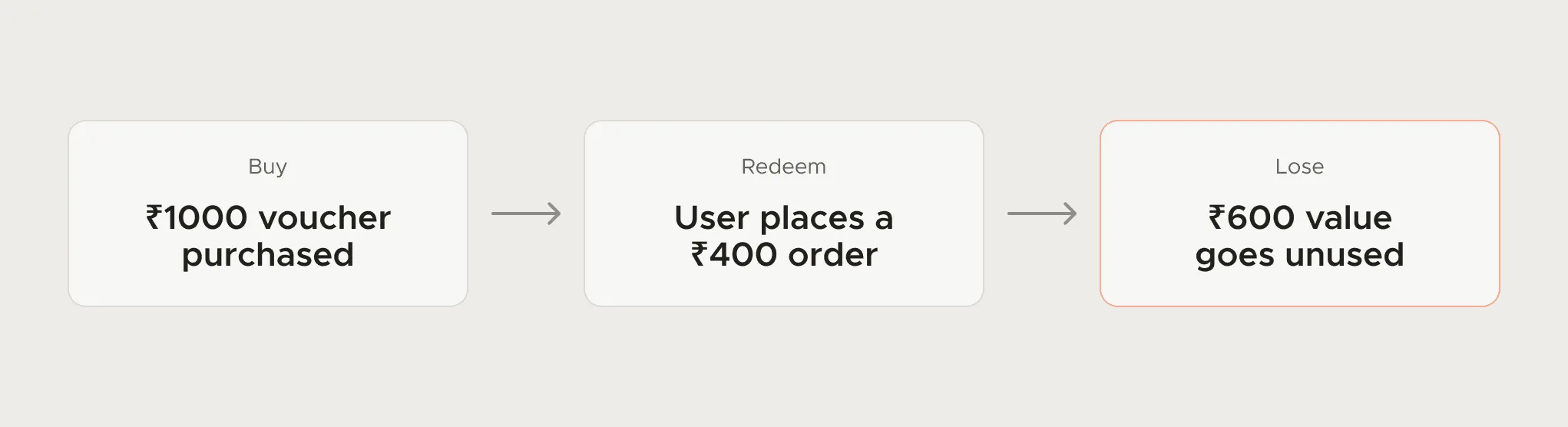
A good problem line names the step, the user and the cost. At FamPay the problem arrived as a support theme: teens bought a one-time-use voucher, spent part of it and lost the rest. That one sentence was enough to design against, and what came of it is in my guide to reducing support tickets with UX.
Send the same brief to every designer you talk to, so the quotes are comparable. To send it to me, email work@utkarshdesign.com or use the hire page.
Questions people ask
What should a design brief include?
The problem with evidence, a goal and metric, the audience, scope in and out, deliverables, constraints, content status, references, decision-makers, timeline and a budget range.
Is the brief I write in the builder stored anywhere?
Only in your browser's local storage. Nothing leaves your device until you send the email yourself.
What is the difference between a design brief and a creative brief?
A creative brief usually covers a campaign: message, audience, tone and channels. A design brief for product or website work adds scope, constraints, deliverables and the metric the design should move.
Should I include a budget in a design brief?
Yes, as a range. It lets the designer suggest the right approach, from adapting a template to a custom build, instead of guessing.
Working on this?
Tell me what you're building and where it's stuck: book a 30-minute call, email work@utkarshdesign.com or send a brief.