Interactive website design for launches
Service · Updated
I design interactive websites where the interaction carries the message: a product demo visitors can try, or a scroll sequence that explains how something works. I build them in Framer, or with AI coding tools when they need a camera, sound or live input. My playground pieces are the proof.
The test for every interaction
Before adding motion or interactivity I ask one question: does a visitor understand something after touching it that they wouldn't get from reading the page? If yes, it earns its place, and it's often the part people remember and share. If not, it's decoration, paid for in load time, accessibility and the visitor's patience.
- Worth it: a demo in the hero where visitors try the core action of your product.
- Also worth it: a scroll sequence that assembles a complex system one part at a time.
- A small toy that is the product's idea in miniature usually earns its place too.
- Decoration: parallax on every section, cursors that lag behind the mouse, text that animates in so slowly people scroll past it.
What I've built for the playground
Most of my interactive work lives on my own site, because that's where I can try things no client has asked for yet. Mitti, at the top of this page, is a pottery wheel you shape with webcam hand gestures. Type Piano is a piano that types posters: each key places a word on a page. Ascii Studio converts an image to ASCII art with physical-looking knobs for detail and contrast.
Type Piano: a synth-style keyboard that sets words, in several scripts, onto a poster.
Others push the input further. In the particle piece, a webcam reads your hand and reshapes a 3D cloud of particles. Bloomlands is a small pixel-art world with a leaderboard and minimap. Sketchpad lets you draw glowing strokes in the air with your fingers.
Particles that follow your hands, with presets, colour and sound controls.
None of these are client sites, and I don't have a client interactive project to show yet. I make them to learn how interaction feels at the edges, so when a brief asks for something memorable I already know what's possible and roughly what it takes.
Interaction on real launch sites
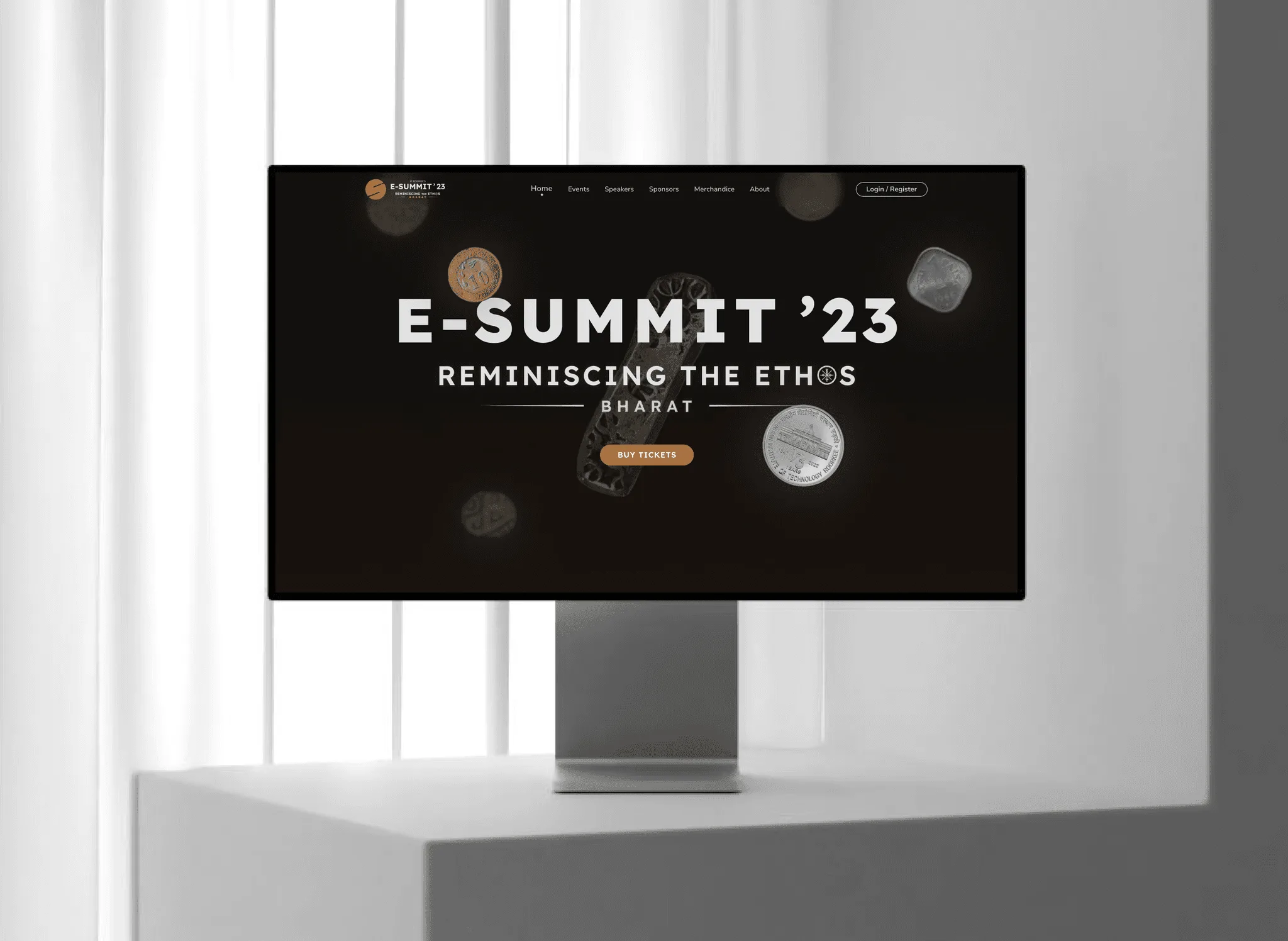
Client and event work needs less of it, and each piece has a specific job. The E-Summit IIT Roorkee website, where I led design, opened on vintage coins floating behind the theme 'Reminiscing the Ethos: Bharat', the same motif as the posters and stage, with tickets one click away. The movement set the tone while the layout kept schedules, speakers and tickets first.
The codeant.ai site I built in Framer sits at the other end: restrained, fast, and built around the demo button. Most startup sites belong closer to that end, with one or two moments of real interaction and very little motion elsewhere.
What a project includes
- An interaction concept: which one or two moments on the site will be interactive, and what each should make the visitor understand.
- Motion and interaction design, prototyped early so you can try it in a browser instead of imagining it from a storyboard.
- The build: in Framer for most sites, or, for pieces that need webcam input, sound or live data, a working component I build with AI coding tools and embed in your Framer or other site.
- Fallbacks: reduced-motion versions, mobile behaviour and a static state for slow devices.
- A performance check, so the interactive moment doesn't cost you load speed on the pages that matter for search.
- Week 1: concept: Agree the message and pick the moments. Rough prototypes of two or three ideas.
- Weeks 2 to 3: build the piece: The chosen interaction, built properly and tested on phones and slow laptops.
- Weeks 3 to 5: the site around it: If it's a full site, the pages, content and Framer build alongside.
- Launch week: Performance and accessibility pass, then handover so your team can edit content.
When to skip it
If your site's job this quarter is to convert enterprise buyers who skim on a work laptop, invest in clarity first and save interaction for the next launch. I also don't build large 3D product configurators or WebGL games for brands. Spline is in my toolkit for lighter 3D, but a heavy 3D experience needs a specialist studio.
If you want something people will try as well as scroll, email work@utkarshdesign.com with what you're launching and when.
Questions people ask
What makes a website interactive?
Parts of the page respond to what the visitor does, beyond clicking links: a demo they can try, content that builds as they scroll, input like typing, a cursor or a camera that changes what they see.
Do interactive websites hurt SEO or speed?
They can. I keep text in the page as real text, load heavy pieces after the main content, and limit interaction to one or two moments so the pages that matter for search stay fast.
Can you add an interactive piece to an existing Framer site?
Yes. A custom piece can sit inside a Framer page as a code component or embed, so the rest of the site stays editable by your team.
How much does an interactive website cost?
It depends on whether it's one interactive moment on a normal site or a whole experience. A single piece adds a few weeks to a build; I scope it after the concept week, and my starting prices for Framer sites are on the pricing page.
Sources
- prefers-reduced-motion, MDN Web Docs
- Understanding Success Criterion 2.3.3: Animation from Interactions, W3C Web Accessibility Initiative
- Largest Contentful Paint (LCP), web.dev
- Code components: Introduction, Framer Developers
Start a project
Tell me what you're building and where it's stuck: book a 30-minute call, email work@utkarshdesign.com or send a brief.