What to include in an MVP design
Guide · 6 min read · By Utkarsh Dhairya Panwar · Updated
An MVP design should include the one path that tests your riskiest assumption, designed end to end with its failure states, and little else. In B2B SaaS I'd make that four screens: sign in, connect real data, see a result, invite a teammate. Settings, billing and roles can stay manual.
Scope by risk, not by feature list
The usual advice is to list every feature and keep the must-haves. Founders rate almost everything as a must-have, so I filter by risk instead. Work out which belief would kill the product if it were wrong, design the screens that test it, and fake the rest.
| Risk | Question the MVP must answer | Screen that answers it | What you can fake |
|---|---|---|---|
| Value | Does the output matter enough to come back? | The first result screen | Volume, speed, edge-case accuracy |
| Setup | Can a real user in a real company get data in? | Connect or import | Every integration except the most common one |
| Spread | Will a second person care? | Invite or share | Roles, permissions beyond owner and member |
| Payment | Will someone pay for this? | A pricing page or a sales call | In-app billing, plan changes, invoices |
Usually one row matters most. If it's value, put almost all design time into the result screen. If it's setup, as it is for most developer tools, the connect step deserves more attention than anything that looks impressive in a demo.
The four screens most B2B MVPs need
- Sign in with what they already use: Google, GitHub or Microsoft. Skip the profile form, the role picker and the team-size question; you can ask those later, once they have a reason to answer.
- Connect real data: This is the step that most often breaks in real companies. Design it for the person who can't finish it alone as well as for the admin.
- The first result, with a finish line: Show the output and say plainly that setup worked. At CodeAnt, defining first-PR success criteria was part of the onboarding work that doubled activation.
- Invite the next person: B2B products activate when two or three people each do their part. A copyable link is enough for an MVP.

At CodeAnt AI the connect step looked fine on paper and failed in practice. Installing the GitHub app on a company org needs admin rights, and most people signing up weren't admins. A request-admin path fixed it (the guide to doubling trial-to-paid at CodeAnt has the full story). If your MVP has a connect step, design the blocked version of it on day one.
What to leave out, and what replaces it
| Usually requested | MVP version | Design it properly when |
|---|---|---|
| Settings page | Sensible defaults, changed by you on request | Customers ask for the same change more than once |
| Billing and plans | A payment link or an invoice | You have more than a handful of paying teams |
| Roles and permissions | Owner and member | A customer's security review requires it |
| Analytics dashboard | A weekly email with three numbers | Users reply asking for history or filters |
| Product tour | A Get Started screen that links to each part | Never, in most cases |
| Notifications centre | Email for the one event that matters | Users act on more than one kind of event |
Keep the states on the screens you keep. An empty state, a loading state, an error with a next step and a no-permission state all belong to the screen. Cutting a whole screen is cheaper and safer than shipping half-finished ones.
SoundSphere: one idea, explored in four weeks
SoundSphere was a four-week exploratory concept. The research signal was one sentence people kept saying about podcasts: "I don't know if it's worth starting." So the concept explored one thing: whether a short AI summary helps someone judge an episode before committing to it.
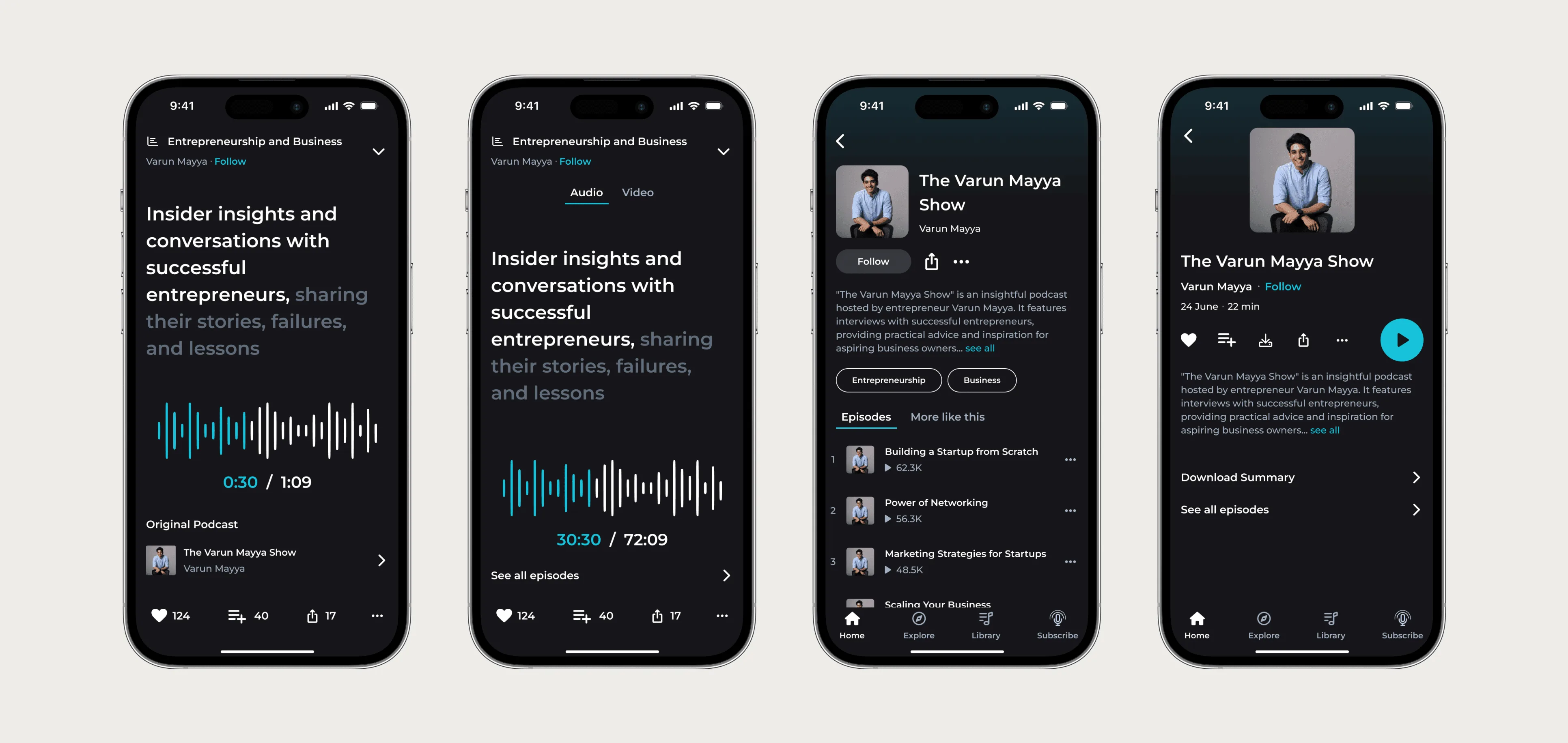
Every other screen in the concept was there to make the summary player believable in context. I'd apply the same test to any MVP screen. Some screens answer the main question and some only make the answer easier to see, and the second kind can be rough.
A one-page MVP scope document
Write this before anyone opens Figma. If it doesn't fit on one page, the scope is too big.
- Problem: one sentence, in the words a user would use.
- Riskiest assumption: the row from the risk table above.
- The path: the screens, in order, from sign-in to the first result.
- Success signal: the event that tells you it worked, and the number you'll watch.
- States included: empty, loading, error, no-permission, success, for every screen on the path.
- Out of scope: a written list, so nobody re-adds it in week two.
- Done by hand: what you'll do manually for the first customers instead of building.
Signs the scope is still too big
- It needs more than one user type to show value.
- There's a settings page before there's a first customer.
- Nobody can say which single number will tell you the MVP worked.
- The scope lists features but no states.
- Design is planned for longer than about four weeks for one area.
Once the scope is cut, my guide to SaaS MVP design cost shows how to turn it into quotes you can compare, and the MVP design service page explains how I'd run it with you.
Questions people ask
What does MVP scope mean?
It's the written list of what the first version includes and, just as important, what it doesn't. A good scope names the riskiest assumption and the one path designed to test it.
How many features should an MVP have?
Count paths, not features. One path from sign-in to first result, with all of its states, is usually enough to learn whether the product works.
Does an MVP need a design system?
A small one helps: colour, type and spacing tokens plus the handful of components every screen repeats. A full library before the product settles is wasted work.
How do I keep MVP scope from growing in an agile team?
Keep the out-of-scope list in the same document as the scope, and add anything new to it rather than to the sprint until the success signal has been measured.
Sources
- Installing a GitHub App from a third party, GitHub Docs
- Onboarding Tutorials vs. Contextual Help, Nielsen Norman Group
Working on this?
Tell me what you're building and where it's stuck: book a 30-minute call, email work@utkarshdesign.com or send a brief.