SaaS signup flow best practices
Guide · 6 min read · By Utkarsh Dhairya Panwar · Updated
A good SaaS signup flow asks only for what the first real result needs and defers everything else until the user has seen value. That means one-click sign-in with the account people already use, no company or role questions up front, and a permission screen that explains itself.
Sign-up is step one of setup
Most signup advice treats the form as its own little conversion problem: fewer fields, bigger button, done. The user didn't come to create an account, though. They came for a result, and every screen between the landing page and that result is one funnel.
The onboarding A/B tests at CodeAnt AI measured the whole path, sign-up included. What I took from them is that steps which each look harmless add up to a wall.
So the question I ask of each field is whether the product needs it before the first result, or whether it's there because someone in sales wants it.
What CodeAnt's sign-up asks for
The sign-in screen has one real decision and four buttons. You choose SaaS or Self Hosted, then sign in with GitHub, GitLab, Bitbucket or Azure DevOps. The 14-day trial is stated on the page, so nobody wonders whether a card is coming.
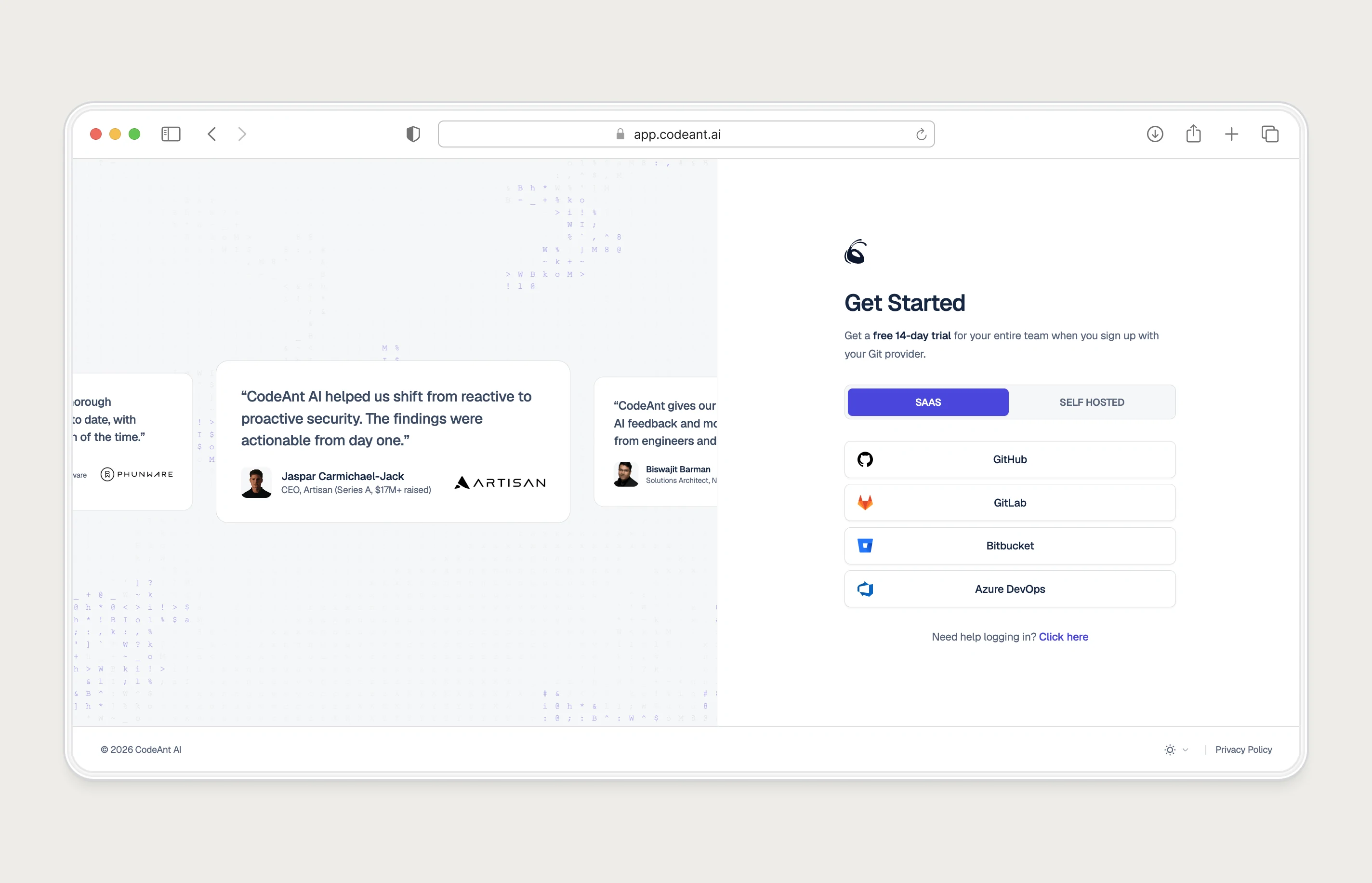
Both choices do real work. The toggle separates self-hosted teams, who need their own guided setup per platform, from cloud users, before either sees a step meant for the other. The Git provider sign-in is identity and the first integration at once, because the product can't do anything without access to code. A developer tool asking for a separate email and password here would be adding a step for no one's benefit.
Fields to defer, and when to ask instead
| Field | Ask at sign-up? | When to ask instead |
|---|---|---|
| Yes, or get it from OAuth | Sign-up | |
| Password | Only if there's no OAuth option | Sign-up, or never |
| Company name | No | When creating a workspace, prefilled from the email domain |
| Role or job title | Only if it changes the first screen | After first value, as a one-tap question |
| Team size | No | At upgrade or when inviting teammates |
| Phone number | No | When the user asks for a call |
| Card details | Not for a free trial | At the end of the trial |
| Invite teammates | No | Right after the first result, when there's something worth sharing |
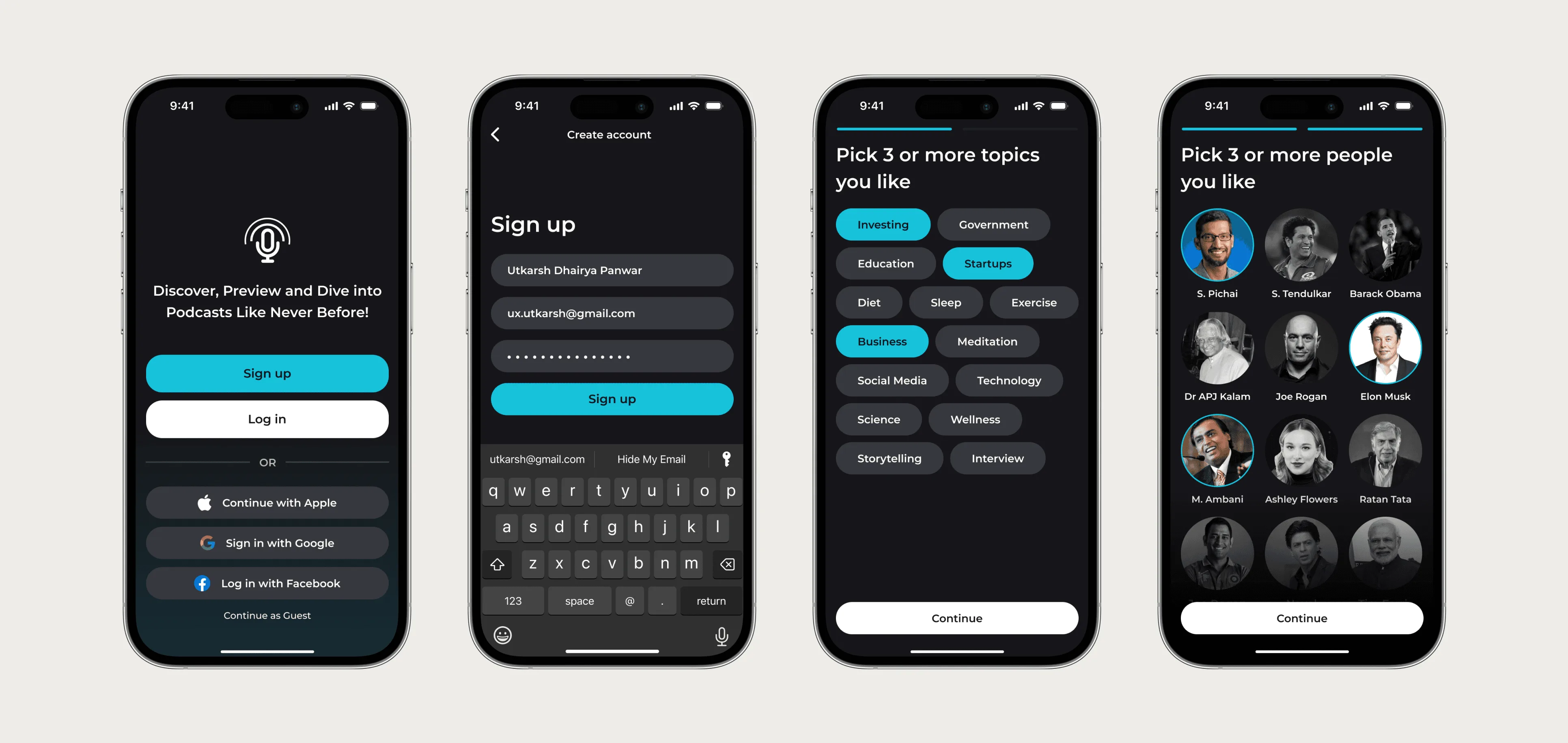
The one exception is a question that changes what the user sees next. SoundSphere asks new listeners to pick a few topics and people because the first feed is built from the answers. CodeAnt asks SaaS or self-hosted because the setup paths are different. If a question changes nothing on the next screen, move it.
The permission screen is part of sign-up
With OAuth, the screen right after sign-in often belongs to someone else: GitHub, Google, Microsoft. You don't control its layout, but you control what you ask for and how you set it up. Ask for the narrowest access that gets the first result, and say on your own screen, before the redirect, what's about to be requested and why.
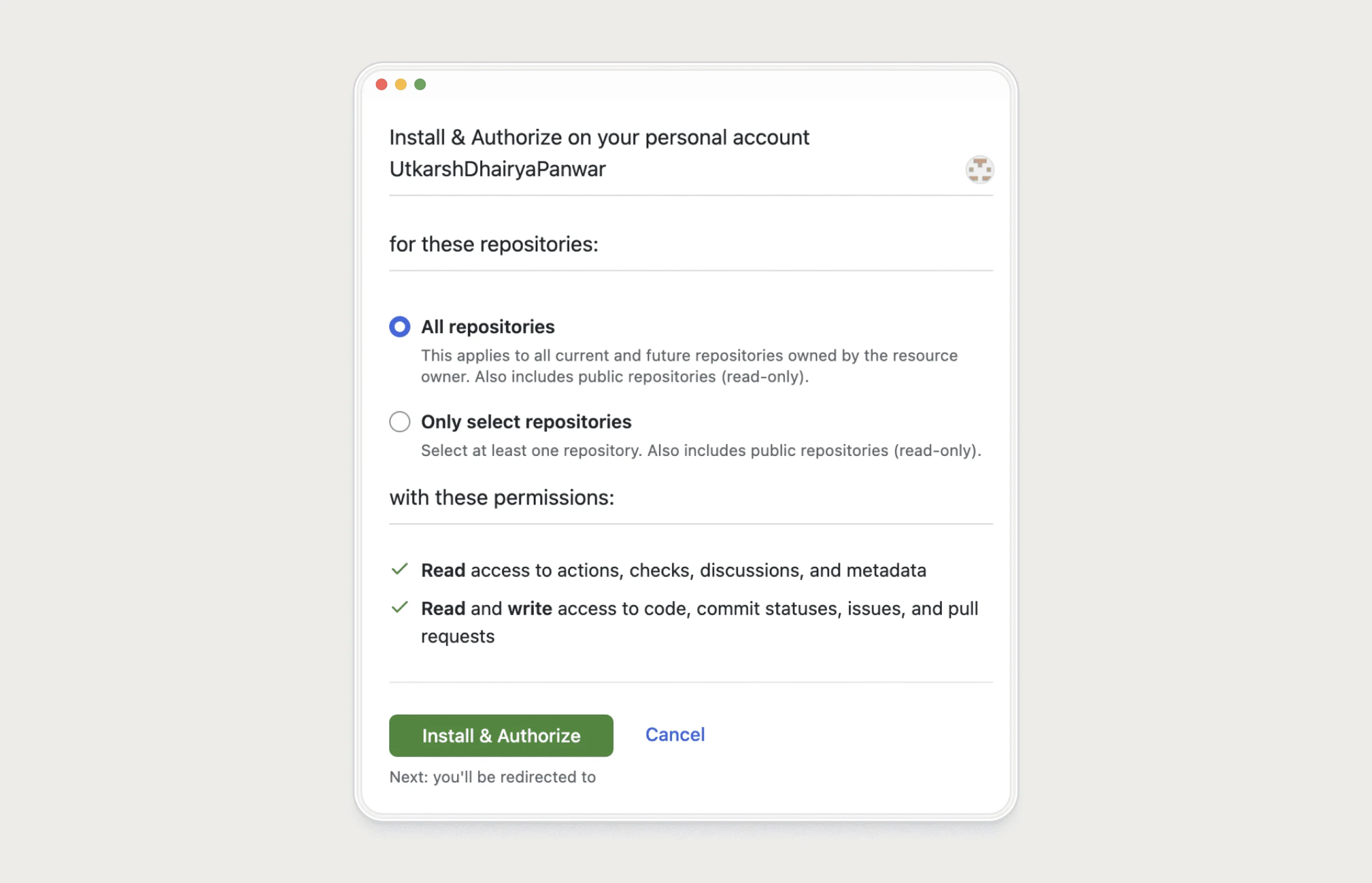
This is also where B2B sign-ups tend to break. Installing an app on a company GitHub org needs an org admin, and most people signing up aren't one. Give them a way to request the admin from inside the product instead of a dead end. The team invite flow guide covers how to design that request, and what the admin should receive.
Small details that cost sign-ups
- Requiring a work email. Suggesting one helps colleagues find the workspace later; forcing one blocks people trying the product on a personal account.
- Verifying email before showing anything. Let people in and verify in the background, unless the product can't run without it.
- Asking for a region or data location with no explanation. If you must ask, say what it affects in one line.
- Hiding the trial terms. If no card is needed, say so on the sign-up page.
- Sending OAuth users back to a form that asks for their name again.
How to test your own signup flow
- Sign up three times: As an admin, as a non-admin from a company account, and on a phone. Use new accounts each time.
- Count screens and fields: From the landing page button to the first real result. Write every field down, with who uses the answer.
- Mark each field: Needed for the first result, needed later, or nobody uses it. Move the second group, delete the third.
- Watch one real person: A five-minute screen share with someone outside the team finds the field that confuses everyone.
To see how Slack, Notion, Calendly, Stripe and others handle these details on their live sign-up pages, read the SaaS onboarding examples. If you'd like this test run on your product with your funnel data, it's the first part of a SaaS onboarding audit.
Questions people ask
How many fields should a SaaS sign-up form have?
As few as the first result needs. With OAuth that can be none; without it, usually an email and a password. Everything else can be asked later.
Should I offer Google or GitHub sign-in?
Offer the account your users already work in. For developer tools that's usually GitHub, GitLab, Bitbucket or Azure DevOps; for general business tools, Google and Microsoft.
Should a free trial ask for a credit card?
For self-serve products I'd avoid it during sign-up and ask at the end of the trial. Whatever you choose, say it plainly on the sign-up page.
When should I ask users to invite teammates?
After the first result, when there's something worth showing them. Earlier, unless the user is blocked and needs an admin to continue.
Sources
- Website Forms Usability: Top 10 Recommendations, Nielsen Norman Group
- Choosing permissions for a GitHub App, GitHub Docs
- Requesting a GitHub App from your organization owner, GitHub Docs
- Using OAuth 2.0 for Web Server Applications, Google for Developers
Working on this?
Tell me what you're building and where it's stuck: book a 30-minute call, email work@utkarshdesign.com or send a brief.